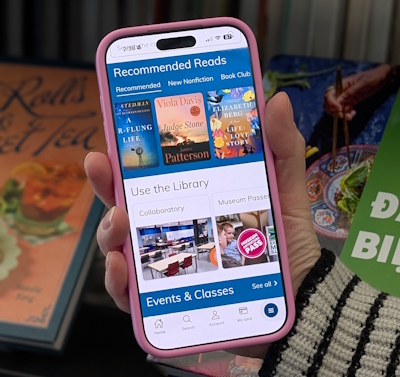

Get the power of the library on your phone with the Northbrook Public Library app
In addition to the features you currently enjoy, the latest version of our app lets you view our event calendar by day, week, or month, and it offers more intuitive room scheduling and a better browsing experience. Get it on the App Store or Google Play
- Access your library account
- Browse and reserve materials
- View programs by day, week, or month, and tap to register
- Manage multiple household accounts on one device
- Reserve a meeting or study room
- Use your digital library card at one of our self-checkout machines, or use the Self-Checkout feature to borrow an item by scanning its barcode with your phone's camera
- Scan an ISBN code to find an item in our catalog
- Easy access to eResources, downloadables, and digital magazines
If you already have the app installed, the new version should appear as an update when it becomes available. (You’ll need to re-enter your login information.) If you haven’t installed the app yet, you can download it from the App Store or Google Play
Want one-on-one help with the app?
Drop by the Reference Department on Tuesdays from 3:00-5:00pm for tech help, or reserve a 30-Minute technology appointment with a librarian.
Frequently Asked Questions
Where do I find the app in the App Store or Google Play?
Use these links to install our app on your Apple (iOS) or Android device, or search for Northbrook Public Library on the App Store or Google Play.
How do I log into the app?
Enter your library card number and password (or your username and password if you set up a username in the Account area of our website).
How do I find my library card number?
Your library card number is on the physical card you were issued. If you can't find it, call 847-272-6224 or email feedback@northbrook.info to receive your library card number.
How do I find my account password/PIN?
You can access your account at www.northbrook.info/account and then click the "Forgot Your Password" link to receive an email with a link to reset your password.
How can I get help downloading or using the app?
If you need help downloading or using the app, please call 847-272-4873 or schedule a one-on-one appointment with a technology expert.
What devices can I use the app with?
You can use it on iOS and Android devices, including tablet devices.
Can I still use the app if I don't have a smartphone or tablet?
Although you can still access our mobile website on many devices, you will not be able to access certain features available in the app, like checking out items and accessing a digital version of your library card.
Can I really check out library items with the app?
Yes! Once you install the app on your smartphone, you can use your phone's camera to scan and check out items. This way, you can skip the line and check out your materials on your own.
Why does the app require access to my camera?
The app uses your phone's camera to scan the item's barcode to use the Self-Checkout and Scan an ISBN features. If you do not want to allow access, you can also enter the number below the barcode.
How do I use my digital library card to check out at the self-check stations?
Tap the "My Library Card" item to access your digital library card, which you can use to scan at the self-check machine. If the machine isn't reading your digital barcode, you may need to turn up the brightness on your device.